
Service · ERP extensions
ERP extensions instead of a new ERP: add-ons for the system you already have
Your ERP does its sums properly. Only the assembly overview, the change notice and the order list are kept in Excel on the side. We build what is missing. The ERP stays as it is.
The ERP stays, the gaps disappear
An ERP covers the standard, and that is its strength: orders, bills of materials, stock and purchase orders are in one place. Wherever your company works differently from the standard, the gaps are filled today by Excel lists, printouts and word of mouth. That works until the list is out of date or the colleague who maintains it is on holiday.
The obvious reflex is a new ERP. But switching ERP ties up the company for a long time, and in the end the new system covers the standard again too. The gap moves house with you.
We take the other route. The ERP remains the source of the data. For the bottleneck that costs you the most, we build an addition that uses this data and shows it where it is needed. Then the next bottleneck gets its turn. No major project, but one step at a time, and after each one you decide again.
Examples
Typical extensions in machine building
Three gaps that come up in almost every machine building company. None of them is a fault of your ERP. They are views and connections that a standard system does not provide.
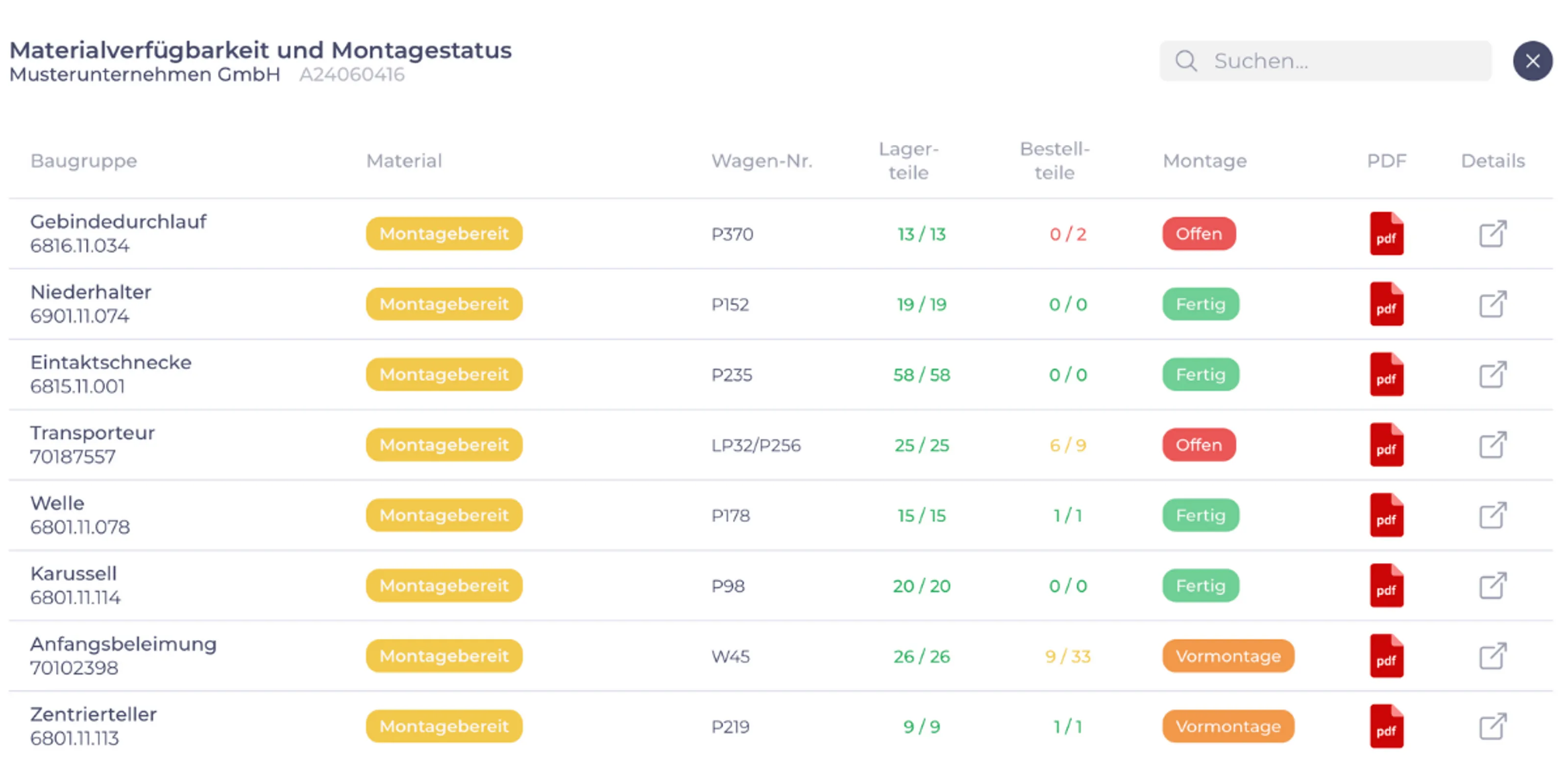
Assembly focuses on what it can actually finish.
Material availability from the ERP, broken down by assembly, as a live view for assembly and project management, not as a printout.
See how it worksChanges arrive before mistakes happen.
Comments and open points for each assembly and item of your order, with status, owners and history.
See how it worksThe machine runs instead of waiting for the setter.
A dashboard at the machine and in production planning, fed by your order data.
See how it worksInterfaces
Interfaces: connect systems, end double data entry
A piece of information is maintained once and shows up wherever it is needed.
In many companies the same piece of information sits in three places: in the ERP, in the CAD system and in a production planning list. Someone types it from one program into the other. At some point one of the three is no longer right, and nobody knows which.
An interface puts an end to that: the bill of materials from design engineering is in the ERP. The feedback from the shop floor is in the order. The delivery date from purchasing is in the assembly overview. Nobody types anything in twice.
Where a connection is missing in your company becomes clear quickly if you follow an order from quotation to delivery: wherever someone retypes, copies or has to ask.
For your IT: We use the access points your system provides. That can be an application programming interface (API), read access to the database or a regular export. Which route fits, we decide together with your IT.
Your system
Which ERP systems we work with
What matters is not the name of the system, but access to the data: through an interface, the database or an export. If one of these routes is open, it can usually be built on.
If we do not know your system yet, we say so openly. Then we look at it together with your IT before we promise anything.
Updates
What happens with the next ERP release?
The concern is justified: whoever tinkers with the ERP risks the next update breaking the customisation, or the vendor refusing responsibility.
That is why we build next to the ERP, not inside it. Our additions use the access points the system provides for this: interfaces, database, exports. The core of the ERP remains untouched. When an update comes, the ERP changes in whatever way the vendor changes it, and our solution keeps running alongside. That is always safer than a customisation inside the system itself, which has to be checked again with every release and often rebuilt.
What can change with a release are the access points: an interface gets a new version, a table name changes. That is manageable and known in advance. How update-proof a solution is in a particular case, we clarify beforehand with your IT and, if needed, with your ERP partner. So you know before the start what to watch out for when the release changes.
Frequently asked questions
What you want to know about ERP extensions
We already have an ERP. Why would we need you?
Good. Your ERP stays, and we build on it. An ERP covers the standard. Wherever your company works differently from the standard, the gap is usually filled by Excel lists and word of mouth. Those are exactly the gaps we close: with additions that run alongside your ERP and use its data.
And if the potential analysis shows that your ERP can already do something, we will tell you. You can take that assessment to your ERP vendor yourself, or we join the conversation.
Do you work with our ERP system?
Very likely. What matters is that we can get to the data: through an interface, the database or an export. If we do not know your system yet, we will say so openly and look at it together with your IT before we promise anything.
Our IT is already stretched. How much work will this mean for them?
Little, and it is predictable. At the start we need the necessary access from your IT and an agreement on your security requirements. Development and rollout are our job.
We still involve your IT from day one, because they should know what runs on their network. It takes work off their plate, too: every Excel list that disappears is one less query for them.
Would we not be better off introducing a new ERP right away?
Sometimes, yes. If the vendor no longer maintains your ERP, if basic functions such as purchasing or warehouse management do not hold up, or if the company has outgrown the system as a whole, an extension will not help. We will tell you so.
If the ERP does its core job properly and things only get stuck at individual points of order processing, an extension is the smaller intervention: the system stays, your people keep working in it as usual, and you solve one bottleneck after another. Which side you are on is something we look at together in the potential analysis.
Your ERP can do almost everything, except what you miss every day?
Tell us where things get stuck. We will tell you honestly whether software pays off at that point and whether we are the right people for it.
Not quite there yet? Two-minute bottleneck check. No sign-up, no email address.